The MicroVision EX takes software updates in the field from a thumb drive — to stay on the latest stable firmware, add new functionality, or fix a controller that is misbehaving.
Updating erases the controller’s program and its logged data. Back both up first — see Before the update — unless they are already saved in the cloud on PULSAlink.
This is a simplified guide. For complete instructions, consult the latest manual or contact the manufacturer; the process may change over time.
¶ Check your hardware version
Controllers made before April 2018 are hardware version 1.0, and use different software from version 2.0. This guide covers version 2.0 only.
Modbus-compatible controllers need the factory’s help to update. Contact the manufacturer.
¶ Pick the correct software
The software depends on the controller model: which probes it has (conductivity, pH, and/or ORP), and whether it has communications. For a conductivity-only controller, also the number of relays — 4 or 5. PTSA and other 4–20 mA probes can be added to any controller and do not change the software.
| Controller model | Communications | Software (hardware 2.0) | Download |
|---|---|---|---|
| MVECXXX… | No | XXXC0011 | mvex-software-xxxc0011.zip |
| MVECXXX… | Yes | XXEC0011 | mvex-software-xxec0011.zip |
| MVEC5XX… | No | 5XXC0011 | mvex-software-5xxc0011.zip |
| MVEC5XX… | Yes | 5XEC0011 | mvex-software-5xec0011.zip |
| MVECPXX… | Yes | PXXC0011 | mvex-software-pxxc0011.zip |
| MVECOXX… | Yes | OXXC0011 | mvex-software-oxxc0011.zip |
| MVECPOX… | Yes | POXC0011 | mvex-software-poxc0011.zip |
Each download is a zip file of about 1 MB. It holds the three files the update needs, and has to be extracted before use — the controller cannot read the zip itself. See Prepare the thumb drive.
The downloads are version C0011, the current release, for hardware version 2.0. It replaces C0009 — the version that fixed calibration offsets for conductivity, pH, and ORP probes entered on the front panel, which with C0008 worked only until the next power cycle.
¶ Prepare the thumb drive
- Extract the zip you downloaded. On Windows, right-click it and choose Extract All; on a Mac, double-click it.
- Copy the three extracted files into the root directory of the thumb drive — not into a folder, and not the zip itself. The controller reads them from there.
- Use a FAT32-formatted drive.
The three files — shown here for an earlier version, POXC0009; C0011’s are the same, with the .uld named for C0011 (such as POXC0011.uld):
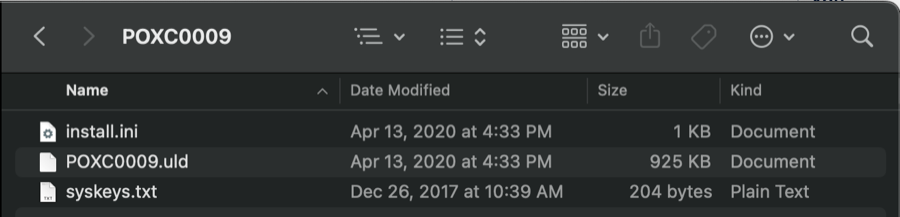
The .uld file is named for the software; install.ini and syskeys.txt have the same names in every version. Keep the three together — they only work as a set.
¶ Before the update
¶ Back up the configuration
- Insert the thumb drive. You can use the one holding the software.
- Wait for USB to appear in the bottom corner of the home screen.
- Go to MENU / COMMUNICATIONS / USB / EXPORT CONFIG FILE.
- A progress bar runs along the bottom of the screen, reaches 100 %, and shows Done.
¶ Back up the data log
To keep the controller’s logged data too, scroll down in the same USB menu and select EXPORT DATA LOG. It takes longer than the configuration export — much longer if a lot of data is stored — and also ends with Done.
¶ Updating
- With the thumb drive inserted and USB showing on the home screen, go to MENU / CONFIGURE / SOFTWARE UPDATE.
- Confirm, then press and hold the UP button and the bottom-left MENU button, as the controller directs.
- Wait 10 seconds, then release.
- The controller reboots and shows the flashing progress.
If it does not start flashing, try again. If it still fails, check the thumb drive’s formatting and the files on it: the three files must be loose in the root of the drive, extracted from the zip — not the zip itself, and not inside a folder.
¶ After the update
- Check the version matches the software you installed — for example POXC0011: MENU / CONFIGURE / VERSION.
- Factory reset the controller: MENU / CONFIGURE / FACTORY RESET.
- Power reset it: remove power, wait 10 seconds, restore power.
- Program the controller, by one of:
- importing the configuration file you exported — see Importing and Exporting Configuration Files;
- importing a file made with Pulsafeeder’s online configurator;
- programming it manually, on the controller or through PULSAlink if it is online.
Check the program looks correct before returning the controller to service.