How the Repressurizer decides when to feed, what raises an alarm, and how to control it locally or through Inteliverse.
¶ Sequence of operation
The controller compares measured pressure against its set points.
A feed cycle starts when all of these are true:
- pressure is below the low set point;
- the pump’s HOA is in Auto;
- the LOW LOW level switch is not triggered;
- the pressure transducer is reading normally.
During a feed cycle the controller keeps checking the HOA state, the pressure against the high set point, the LOW LOW level switch, and communication with the pressure transducer.
The feed stops once pressure exceeds the high set point.
¶ Alarms
The controller raises an alarm when:
- the pressure transducer has a problem, or
- the tank is at LOW LOW level.
While an alarm is active the feed pump does not run — unless it has been forced on by hand. Relay 2 is wired to the alarm light and switches it on for a critical alarm.
The alarm light shows alarms, not the status light. The status light is about connectivity — see Status light.
Online, alarms are also sent through Inteliverse.
¶ The HOA button
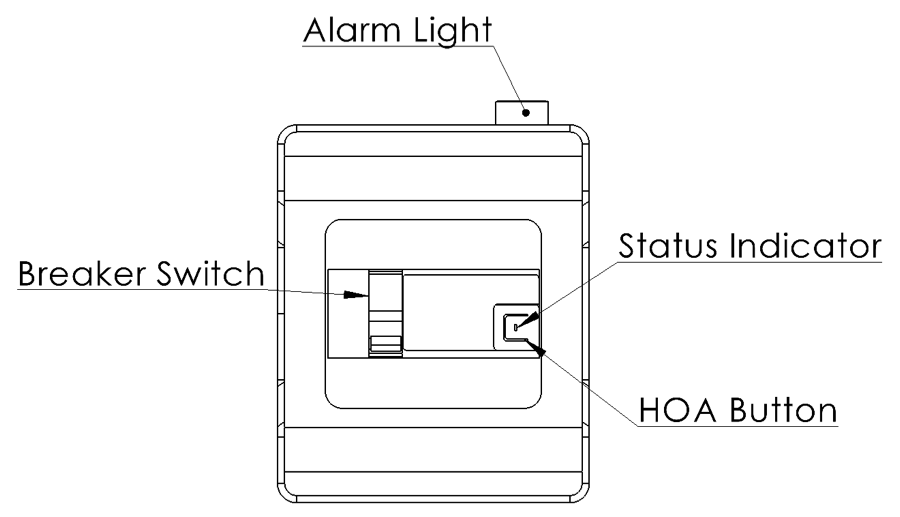
The controller has one button, the HOA button, beside the status indicator. A short press steps the pump’s relay through its three states:
| State | Status light (for 5 s) | What it does |
|---|---|---|
| Auto | Orange | The sequence of operation controls the pump. The normal state. |
| On (Hand) | White | Forces the pump on for 5 minutes |
| Off | Red | Keeps the pump off |
After 5 seconds the light returns to its normal status.
On (Hand) runs the pump regardless of pressure. Stay with the system while it runs by hand, and watch the pressure gauge.
The same button also factory resets the controller if held down.
¶ Mobile app
With the app you can view the system and change its HOA, set points, and settings — directly over Wi-Fi Direct when you are beside it, or from anywhere once it is online. Everything other than the HOA button needs the app or the web portal.
¶ Web portal
Online systems can also be managed from any web browser at inteliverse.app/login. Sign in with your account email address; use forgot password if needed. The dashboard shows the system’s telemetry and lets you change its settings remotely.