Every output the InteliHive drives — a relay, a valve, a pump — has an HOA setting: Hand, Off, Auto. It decides who is in charge of that output. In Auto the control mode is; in Hand or Off you are. Use it to test a pump, prime a line, hold a valve shut, or take a faulty output out of service — then hand it back to its control mode.
Hand On runs equipment with no control logic behind it. Interlocks, limits, and the control mode do not stop it — only the run time does. Stay with it while it runs.
Off is not isolation. Off is a setting in the controller, not a disconnect. Someone can set the output back to Auto, from the screen or the app, and the equipment can start. Before working on equipment, isolate and lock it out — see Isolating Equipment.
¶ The three settings
| Setting | Who is in charge | What happens | How long | |
|---|---|---|---|---|
  |
Auto | The control mode | The control mode switches the output on and off — or opens and closes it — as the process needs. The normal setting. | Until changed |
 |
On (Hand) | You | The output is switched on — or opened — whatever the control mode wants | Timed: 5 minutes unless you choose otherwise, up to 2 hours. Then it returns to Auto. |
 |
Off | You | The output is held off — or closed — whatever the control mode wants | Indefinitely, until someone changes it. Survives a restart or a power cut. |
For a valve, the settings read Auto, Open, and Close, with the same icons.
¶ What outranks what
When more than one thing wants to drive an output, the highest wins:
- HOA — Hand On or Off, unconditionally.
- Interlocks on the output’s control mode.
- An active calendar event.
- The output’s own control mode.
HOA sits above everything. That is what makes it useful — and why Hand On needs someone watching it.
¶ Where to find it
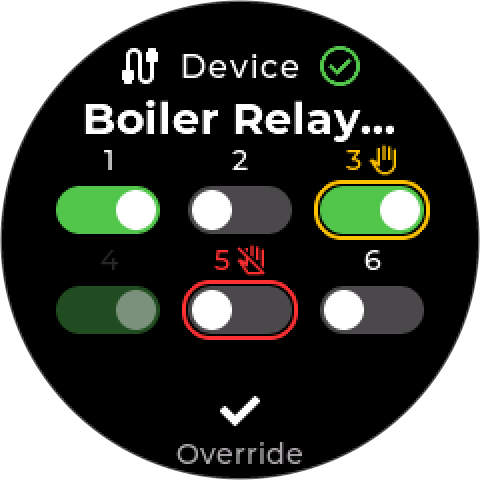
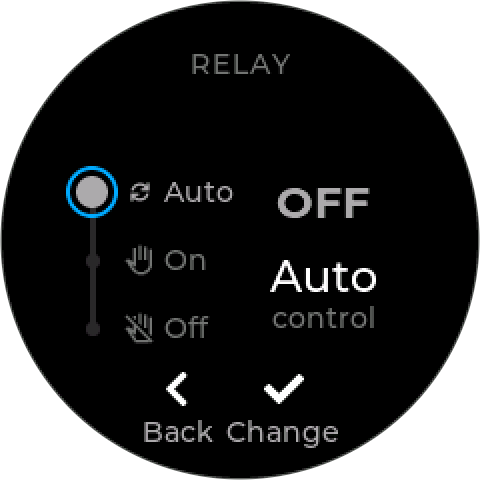
- A relay device — Legacy Relay Device 6, Wireless Relay Expander, Wireless Relay Strip: open its tile and press Enter (Override). Choose the output from the list, then the setting.
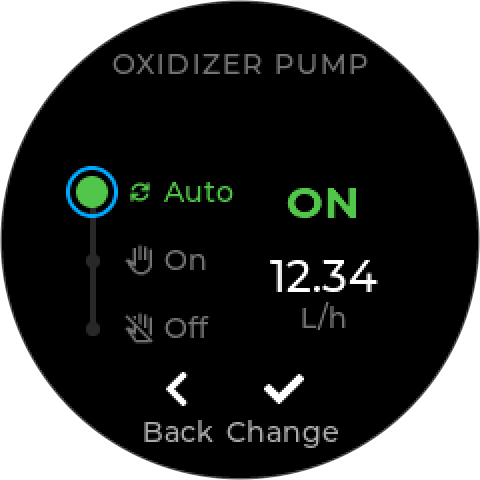
- A NextStep pump — open its tile, press Enter, and choose Control. The pump’s live state is shown beside the choice.
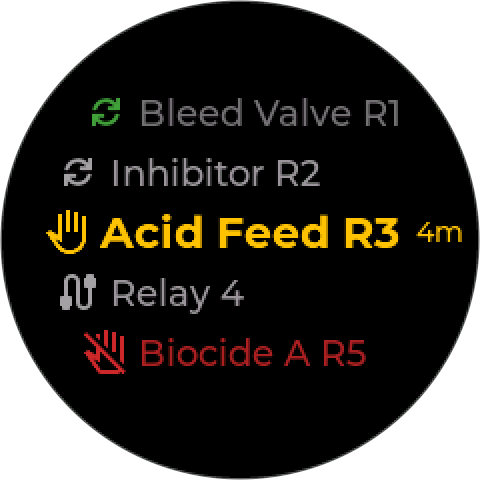
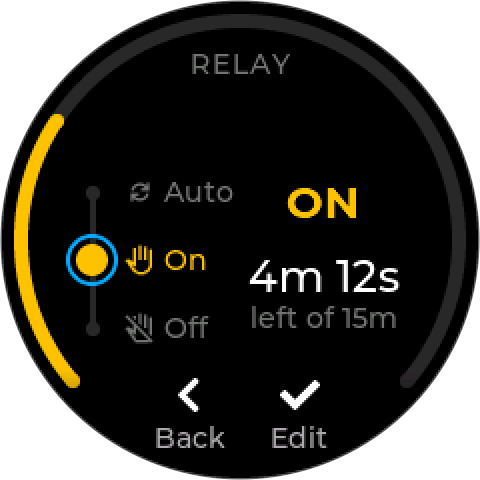
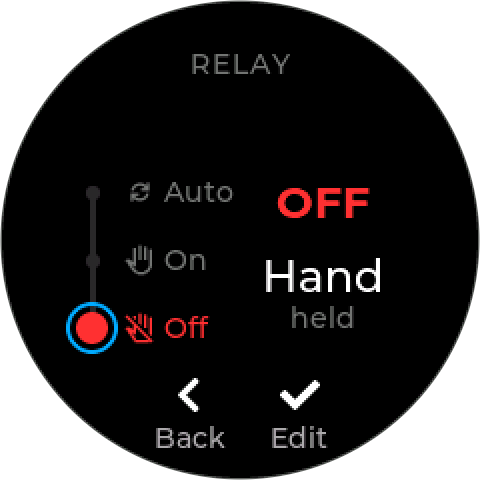
The output list shows each output’s name, its icon, and the time left on a Hand On. On the setting screen, Up and Down move between Auto, On, and Off; Enter applies it. Each choice carries its icon, and the one the output holds is lit in its own color. While an output is in Hand, the screen counts down the time left.
¶ The HOA icons
Everywhere else, an output’s HOA setting is shown by icon, not by name. The shape says who is in charge — the arrows for the control mode, a hand for you. The color says what the output is doing.
| Icon | Who is in charge | The output is |
|---|---|---|
|
Auto — the control mode | On (or open) — green |
|
Auto — the control mode | Off (or closed) — gray |
|
You — Hand On | On (or open) — amber, with the time left beside it, such as 15m |
|
You — Off | Held off (or closed) — red |
The arrows only appear on an output a control mode drives. An output in Auto that no control mode uses has nothing in charge of it: in the output list it shows the device’s own icon in gray (like Relay 4 below), and on a device’s tile its toggle is grayed out.
Two hands mean someone has taken over. Any hand icon on the home screens is an output that is not following its control mode. Amber will switch itself back to Auto when its time runs out; red stays until someone sets it back.
The colors are the ones relay HOA keys have long used on water-treatment controllers — amber for hand, red for forced off, green for auto and running. The shapes are different on purpose, so the icons can be told apart without relying on color.
¶ Where the icons appear
| On | What you see |
|---|---|
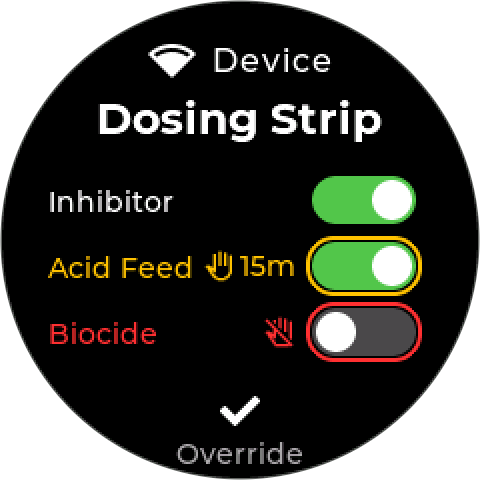
| A device’s tile — relay device or pump | An outlet someone has taken over from its control mode: a ring in the hold’s color round its toggle, its icon (with the time left on a Hand On), and its number or name in that color. An outlet in Auto shows nothing extra; an Auto outlet no control mode drives is greyed out. |
| The output list (Override) | Each output’s name, its icon, and its time left in Hand On |
| A control mode’s tile | The icon of the mode’s output, beside the padlock. A hand means the mode is running but its output is not following it. |
| A calendar program’s tile | The icon of the output the event drives, beside the padlock |
| The HOA screen | The icon beside each choice, and the current one lit in its color |
On a device’s tile. Only a hand hold is marked: amber for Hand On, red for Off, in a ring round the toggle, the icon, and the number (a bank of five or six) or name (a strip). On a strip the icon and the time left sit next to the toggle; on a six-relay bank the number and a small icon sit over it. An outlet in Auto adds nothing, and an Auto outlet that no control mode drives is greyed out, as if disabled.
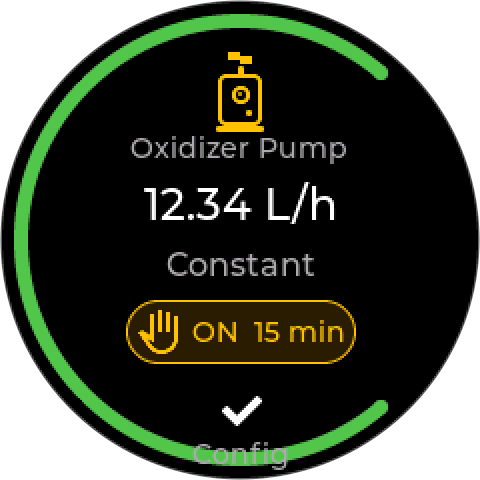
On a control mode’s tile. The icon sits beside the padlock at the top. The same tile with the output in Auto and on, in Hand On with 15 minutes left, and held Off:
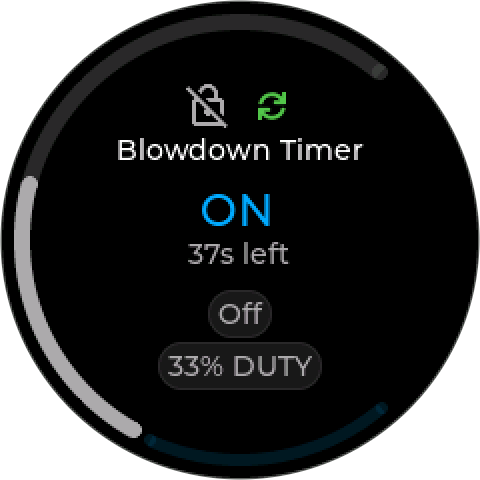
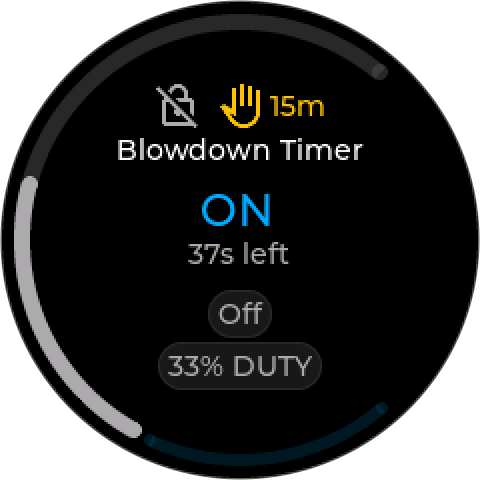
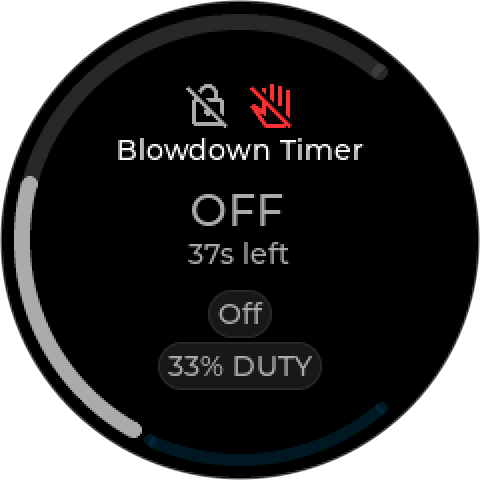
A device that is disconnected shows a struck-through device icon and Offline instead of an HOA icon: the controller cannot tell what its output is doing.
Coming in a firmware update. Current firmware names the setting in text instead — ON (Auto), HOA ON, HOA 15m, OFF (HOA) — still in amber for Hand and Off. The meanings are the same.
¶ Auto
In Auto, the output belongs to its control mode. The mode decides, moment to moment, whether it is on or off — and the interlocks and limits on that mode apply.
- No control mode uses the output — nothing switches it on. It stays in its safe state.
- The control mode is disabled or deleted — the output goes to its safe state.
- The device reconnects after a dropout — the output goes straight back to what the control mode wants.
Choosing Auto while an output is in Hand ends the Hand run or the hold at once.
¶ On (Hand)
Use On to run an output when the control mode would not: to test a pump, prime a feed line, flush, or check that a valve really opens.
¶ It is always timed
Choosing On asks Run for: 5m, 15m, or Custom — anything from 1 minute up to the output’s limit, which is 2 hours for relay outputs. Choices longer than the output’s limit are not offered. There is no way to switch an output on by hand indefinitely.
A NextStep pump runs at its configured rate for 1 to 60 minutes. Each pump keeps its own Hand run, so running a second pump by hand does not cut the first one short. (Upcoming firmware fixes a pump that kept running after its Hand time, until its own timeout.)
¶ When the time is up
The output goes back to Auto — not to Off:
- If a control mode owns it, the mode takes over at once — switching it off, or keeping it on if the mode wants it on. A relay may switch off for a moment before the mode switches it back on.
- With no control mode, it switches off.
To end a run early, choose Auto (back to the control mode) or Off (held off).
¶ If the controller stops
The time limit still holds if the controller loses power or stops working:
- a Wireless Relay Expander switches itself off at the end of the time;
- a Wireless Relay Strip switches itself off about 30 seconds after the controller stops renewing it;
- a port-powered Legacy Relay Device 6 loses power when the controller does, so its relays drop out.
An output that cannot guarantee that does not offer On — the choice is dimmed. If the controller refuses it anyway it shows Manual On not available here. An externally powered Legacy Relay Device 6 is one of these: if the controller stopped, nothing would switch its relay off.
If the controller restarts during a run, the run picks up where it left off, for the time remaining. A run that ran out while the controller was off ends at start-up, and the output goes back to Auto.
¶ It needs the time set
A timed run needs a trusted clock. Before the controller has the time, On is refused with Clock not set - a timed run needs it — see Time Not Set (521). Off and Auto work without it.
¶ Off
Use Off to take an output out of service and keep it out:
- Maintenance — while someone works on the pump, valve, or line it serves. Isolate it as well: see the warning at the top.
- A faulty output — a pump that leaks, a valve that sticks, a relay that chatters.
- A faulty input — a probe reading wrong, or a level sensor that has failed, would make its control mode drive the output wrongly. Hold the output off until the sensor is fixed or replaced.
Off has no time limit. It stays until someone sets the output back to Auto — through restarts and power cuts. Choosing Off during a Hand run ends the run.
The control mode keeps running while its output is held off: it still reads its sensor, works out what it wants, and raises its alarms. Its tile shows the red crossed-hand icon (OFF (HOA) on earlier firmware) so it is clear why nothing is happening.
Enabling a mode does not undo Off. If you enable a control mode whose output is held off, the controller warns you — Output off by hand — and offers Return to Auto + enable, or Enable, leave off.
An output left in Off raises no alarm. It is easy to forget. Before leaving site, check every output you held off is back in Auto — or note on the Output Assignment Sheet why it is not.
¶ Remotely
HOA can also be set remotely, through Inteliverse, as well as on the controller, with the same three settings and the same time limits. A Hand run started remotely needs a run time too.
- A remote change needs the controller’s clock to be set for any HOA change — Auto and Off included.
- If someone changes an output remotely while you have its HOA screen open on the controller, the screen tells you — for example Feed Pump set to HOA OFF remotely.
¶ If the device is offline
An HOA change needs the device connected. If the device is disconnected, the change fails, and the output’s setting stays as it was. Set it again once the device is back.
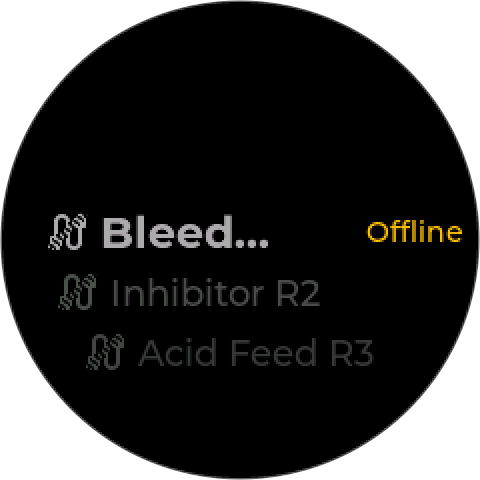
A setting that was already in place is kept: when the device reconnects, a held Off is driven off again, a Hand run with time left carries on, and Auto goes back to what the control mode wants.
¶ Switched at the device itself
Switching a relay at the device itself — on a Wireless Relay Strip or Expander, or on a Legacy Relay Device 6 — is not the same as Hand on the controller. The controller adopts the change and raises Local Override (231), named for the relay and what was done: Feed Pump Manual On - 5 min or Feed Pump Manual Off. A relay switched on by hand returns to Auto after its time; one switched off stays off until set back to Auto. The alarm clears itself when the relay is back under Auto.
The controller only adopts a change it sees on three readings in a row, so a reading that crosses a command it has just sent is not mistaken for someone at the device.
If an output was switched off at the device, enabling its control mode will not make it run: the controller warns you and offers Return to Auto + enable.
¶ The buttons on a Wireless Relay Strip
Each outlet on a Wireless Relay Strip has a button that toggles it: a press turns an outlet that is off on, and one that is on off. The controller reads each press as an HOA change. What the press does depends on the setting the outlet is in:
| The outlet is in | A press turns it | It goes to | Then |
|---|---|---|---|
| Auto, off |
On | Hand On, 5 minutes |
Back to Auto when the time is up |
| Auto, on |
Off | Off |
Stays off until someone sets it back to Auto |
| Hand On |
Off | Back to the setting it had before the Hand On — Auto or Off |
— |
| Off |
On | Hand On, 5 minutes |
Back to Off when the time is up |
The rule behind it: a press that turns an outlet on is always a short, timed run, and when that run ends — by a second press or by its time running out — the outlet goes back to what it was doing before. A press that turns off an outlet running under Auto holds it off until someone deals with it.
- Testing a pump at the strip: press once to run it for 5 minutes, press again to stop it early. Either way, the outlet goes back to where it was.
- An outlet held Off stays Off. Pressing its button runs the load for 5 minutes, then the outlet is held off again — an output taken out of service for a fault does not quietly return to service.
- A second press may not switch it off. If the outlet goes back to Auto and its control mode wants it on, the mode switches it straight back on.
Every press raises Local Override (231), like any other change made at the device.
Coming in a firmware update. Current firmware treats a press during a Hand On as a switch to Off, and a press-started Hand On always returns to Auto — even on an outlet that was held off.
¶ If you know HOA from other controllers
HOA is a standard idea in water-treatment controllers, but the details differ. On a Pulsafeeder Pulsatrol MC9300/9500, for example, each relay has a key: press once for on for five minutes, twice for off, three times for auto.
| Pulsatrol MC9300/9500 | InteliHive | |
|---|---|---|
| Hand On | 5 minutes, fixed | 5 minutes unless you choose otherwise, up to 2 hours |
| After Hand On | Returns to Auto | Returns to Auto |
| Off | Until the key is pressed again — or the power is cycled | Until set back to Auto — survives a power cycle |
| Where | A key per relay on the front panel | The output’s HOA screen, on the controller or remotely |
| Shown by | A light under each key — amber Hand, red Off, green Auto and on, unlit Auto and off | An icon per output, in the same colors |
The difference that matters: cycling power does not clear an InteliHive Off. That is deliberate — an output held off for a fault should stay off after a power cut — but it means power-cycling is not a way to put things back to normal. Set each output back to Auto.
¶ Sources
- Pulsafeeder: Pulsatrol MC9300 / MC9500 series technical reference guide (PDF) — section 3.4, relay keys
- HOA icons: the hands are Google Material Symbols back_hand and do_not_touch (Apache License 2.0); the Auto arrows are the Font Awesome sync icon (CC BY 4.0) — the symbol the controller’s display uses.
¶ Related
- Output Assignment Sheet — which output drives what
- Control Modes
- Interlocks
- Isolating Equipment
- Error 231 — Local Override
- Error 521 — Time Not Set
- Safety