An interlock stops a control mode running while a condition holds — no flow, a low tank, an external stop — whatever the mode itself would decide. The mode’s output goes to its safe state, and the mode resumes on its own when the condition clears.
Interlocks are process protection, not personnel protection. They keep a pump from running dry or feeding into a dead line. They do not make equipment safe to work on — isolate it physically. See Safety.
¶ What can be an interlock
Interlocks come from contacts wired to an IO-Link port, from an IO-Link level sensor’s own low and low-low levels, and from limits on Modbus probes. Each mode can have up to eight.
| Source | Blocks the mode when… | Set it up first under |
|---|---|---|
| Flow Switch | There is no flow (contact open) | The IO-Link pin — Contacts |
| External Stop | The stop contact is closed | The IO-Link pin |
| Level switch | The contact is in the state you chose as disable | The IO-Link pin |
| Sensor limit | A Modbus probe’s reading is past a limit — low-low, low, high, or high-high. IO-Link sensor limits cannot be set from the screen yet. | The probe’s Limits |
| Tank low, Tank low-low | A Pyxis LS-200/202 tank is below its low or low-low level | The probe’s tank settings |
| Sensor’s own limit | The sensor’s own switch output says the level is past a limit | The sensor itself, or its tank settings |
| During calendar event | Any Calendar program is running | Nothing — added from the mode’s interlock list |
Limits count on their own side. A low interlock also trips at low-low — a tank past low-low is not less empty. A low interlock never trips on a high reading, and the reverse.
Wireless devices cannot be interlocks. To gate a mode on a condition from a wireless device, bring it in on an IO-Link contact instead.
Modbus probe limits as interlocks are new in an upcoming firmware update. In earlier firmware only IO-Link sources are offered, and limits on a Modbus probe raise alarms but do not stop a mode.
¶ During calendar event
Offered on Percent Timer and Volume Dosing modes only, and only on firmware with Calendar — field-test builds. A rule saved earlier still shows, as During calendar event, and can be edited or removed on any build. It pauses the feed while any calendar program runs, so two chemistries are never fed at once.
Choose Pause feed. The screen also offers Accrue missed feed, meant to make up the feed after the event. That is not implemented yet: a mode set to accrue is not paused at all and keeps feeding through the event.
¶ Adding an interlock
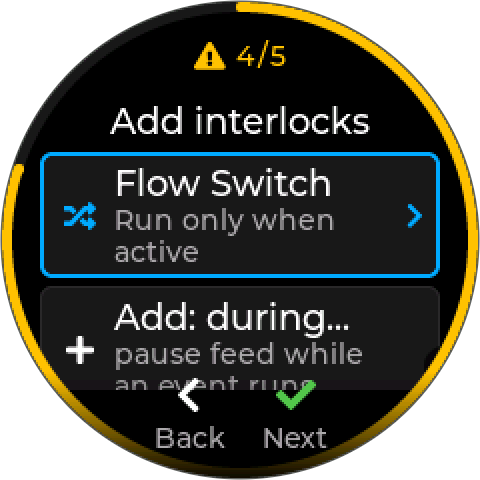
- Set up the source. Configure the contact on its IO-Link pin, set the limit on a Modbus probe’s Limits screen, or enter a level sensor’s tank settings. A source that is not set up is not offered.
- In the control mode wizard, at Add interlocks, choose Add interlock and pick the source. For a timer or volume mode, Add: during calendar event adds that rule.
- Continue with Next. Interlocks are optional — a mode with none is valid.
If no source exists yet, the list says None yet — add an IO-Link pin as External Stop.
A flow switch is added for you. If the controller has a Flow Switch configured, every new mode starts with it as an interlock. Remove it from the list if a mode should not be flow-gated.
¶ What happens when an interlock trips
The output goes to its safe state — normally off — and the controller raises Policy Blocked (200), naming the contact where there is one: Flow Switch - A I/Q. The mode’s tile shows a padlock. When the condition clears, the alarm clears and the mode carries on.
How each mode carries on differs:
| Mode | While blocked | When it clears |
|---|---|---|
| Setpoint Control | Output held in its safe state | Resumes deciding from the live reading |
| Percent Timer | Output held in its safe state; the cycle’s countdown is frozen | Carries on with the time the cycle had left |
| Volume Dosing | Output held off — always, whatever its safe state; any dose in progress is frozen | Finishes the dose; volume counted meanwhile is fed, up to Max Pending |
| Calendar | A program due to start waits; a running step pauses | The waiting program starts; a paused step resumes |
A during calendar event pause holds a timer or dose output off. If an interlock and a calendar pause both apply, the interlock’s hold wins.
Changed in an upcoming firmware update. Earlier firmware let an interlocked timer keep counting, so a short block could cut the rest of an on-phase short, and drove interlocked timers off even where the output’s safe state was on.
¶ When an interlock’s device is removed
Removing a device does not delete the interlock rules that use it. Each rule is kept, renamed Device removed, and blocks its mode at once: the mode stays enabled but stops, with its output in its safe state, until the rule is fixed. A mode is never left running with its protection silently gone.
The removal dialog says so first — for example This will also stop 1 control mode until its interlock is re-pointed. Afterwards the controller raises Config Changed (531), and the control-mode list shows the mode as BLOCKED — Blocked: interlock device removed.
To fix it, open the mode, then the rule:
- Change device — pick the replacement. Only devices the rule can use are offered: a contact for a contact rule, a reading of the same kind for a limit rule. Re-adding the old device does not re-bind it; use Change device.
- Remove — delete the rule, if the mode no longer needs it.
When you save, the controller asks This mode will start running again. If the mode’s safety trip had latched, it adds Its safety latch is still set.
¶ Change device on any rule
Change device also moves a working rule to a different device without rebuilding it — a replaced flow switch on another port, say. The rule keeps its sense and settings. A limit rule keeps its limit only if the new reading is in the same unit; moved from pH to ORP, it asks for the limit again.
New in an upcoming firmware update. Earlier firmware deleted the interlock rules on a removed device, and the mode carried on without them.
¶ When an interlock cannot be checked
An interlock that cannot be checked blocks. A mode is never allowed to run on the strength of a reading nobody could take.
- Contacts block immediately if they cannot be read. A contact is a permit — “run only when there is flow” — so an unread one is treated as no permit.
- Sensors get five seconds. A sensor on the IO-Link bus can miss a reading now and then, so a sensor interlock blocks only once it has been unreadable for five seconds.
- A Modbus probe that stops answering blocks its limit interlocks, like any lost device. A Modbus probe that is answering counts as healthy: unlike IO-Link sensors, Modbus probes report no separate fault signal.
- A faulty sensor blocks a limit interlock. If the sensor behind a level interlock reports that its measurement is unusable, the interlock blocks — the controller cannot confirm the tank is not low. A fault that proves the opposite does not block: a radar sensor that cannot read because the surface is too close is showing a full tank, not a low one.
One unreadable sensor can hide every other interlock. Rules are checked in order, and the alarm names the first one blocking. A sensor that keeps dropping blocks the mode continuously, and the interlocks behind it are never reached — they look as if they have stopped working. Fix the unreadable one first.
¶ Troubleshooting
| Symptom | Likely cause | What to do |
|---|---|---|
| Mode will not run, Policy Blocked (200) | An interlock is tripped | The alarm names the source. Check the contact or reading. |
| Blocked, but the flow switch shows flow | A different interlock — often an unreadable sensor — is blocking first | Check every interlock on the mode, starting with sensors that have been dropping out. |
| Flow switch works backwards | Contact wired the other way from the Flow Switch convention | Flow Switch expects closed = flow. Rewire, or set the pin to Level and choose its On Close action. |
| Source not offered in the picker | Not set up, or a wireless device | Configure the pin, the sensor’s Limits, or the level probe’s tank settings first. Wireless devices are not offered. |
| A limit tier missing from the picker | That tier is not enabled on the sensor’s Limits | Enable the tier, then add the interlock. |
| Timer kept feeding during a calendar event | The calendar interlock is set to Accrue missed feed | Change it to Pause feed. |
| Every mode has a flow-switch interlock | Added automatically when a Flow Switch exists | Remove it from the modes that should not be gated. |
¶ Related
- Cooling towers — Sample and Bleed Plumbing — where the flow switch goes
- Safety Trips and Rate Limits
- Control Modes
- IO-Link devices — contacts, limits, and tank settings
- Modbus Probes — level probe tank settings
- Calendar
- Error codes
- Safety