A control mode is a rule that decides when an output runs — a pump, a valve, a relay. Each mode drives one output, and the controller runs every enabled mode continuously, twice a second.
¶ Choosing a mode
| Mode | Runs the output when… | Needs a sensor? | Typical use |
|---|---|---|---|
| Setpoint Control | A reading crosses a target value | Yes | Conductivity bleed, ORP or pH feed, boiler blowdown |
| Percent Timer | For a fixed share of every cycle | No | Steady inhibitor or biocide feed |
| Volume Dosing | A water meter counts a set volume | Yes — a water meter | Feed proportional to make-up water |
| Calendar | On a schedule, as a sequence of steps | Optional | Weekly biocide slug, ORP boost |
Measure what you are controlling and use Setpoint Control. It responds to the water rather than to the clock.
Feed in proportion to water use with Volume Dosing. Chemical tracks load automatically, where a timer overfeeds a quiet system and underfeeds a busy one.
Feed blind at a steady rate with Percent Timer when there is no probe for the chemical and no meter.
Run something at a set time with Calendar.
¶ Creating a mode
On the controller, go to Settings → Control Modes → Add mode. The wizard steps through:
- Choose type — one of the modes above.
- Select input — the sensor channel (Setpoint Control and Volume Dosing only).
- Select output — the relay, pump, or outlet to drive.
- Tune behavior — the mode’s own settings.
- Choose sampling — how the sensor is read (Setpoint Control only).
- Add interlocks — conditions that stop the mode running.
- Name mode, then Review & save.
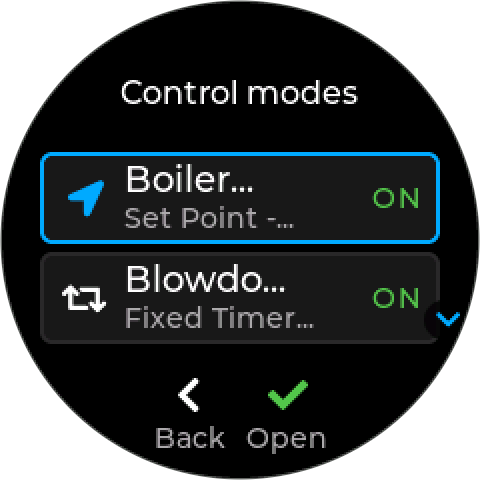
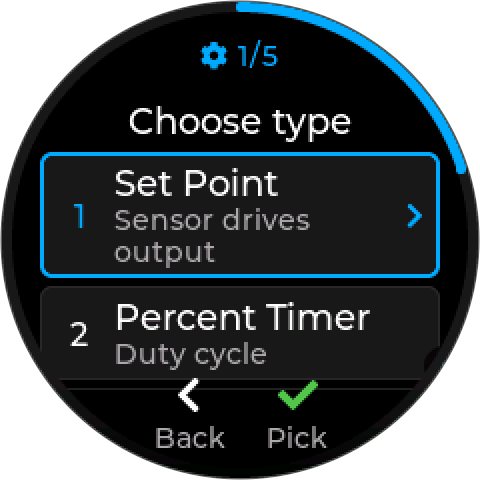
The number at the top counts the steps; the ring around the edge fills as you go.
Only channels that suit the mode are offered. Setpoint Control lists measured readings only; Volume Dosing lists only channels that accumulate volume. A channel that is shown greyed out says why — tap it for the reason.
One output, one mode. An output can be driven by only one enabled mode at a time. A relay already in use shows the name of the mode that owns it.
A mode saved without its devices is kept but marked Incomplete, and cannot be enabled until they are selected.
If a save is refused — a name already in use, an output another mode owns — the controller says why and takes you back to the step that needs changing, with your other edits kept. (Upcoming firmware; earlier firmware discarded the edits.)
¶ Blocked modes
A mode can be enabled but blocked: switched on, but unable to run because something it needs has gone — usually a device that was removed. Its output is held in its safe state, and the control-mode list shows BLOCKED with the reason:
| Shown | Means | Fix |
|---|---|---|
| Blocked: no input sensor | Its sensor was removed | Open the mode and choose a new input |
| Blocked: no output | Its output was removed | Choose a new output |
| Blocked: interlock device removed | An interlock’s device was removed | Change device on the rule — see Interlocks |
| Blocked: interlock has no device | An interlock rule was saved without a device | Change device, or remove the rule |
| Blocked: no mode to run, no action sensor, a phase has no output, an empty lockout | A Calendar program lost a mode or device it used | Open the program and choose a new one |
When a fix makes the mode runnable again, saving asks This mode will start running again — Start or Cancel — so it never restarts unexpectedly. The controller raises Config Changed (531) whenever it blocks a mode by itself. (Upcoming firmware; earlier firmware switched such modes off.)
¶ Interlocks
An interlock stops a mode running while a condition holds — no flow, a low tank, an external stop — whatever the mode itself would decide. Each mode can have up to eight, taken from IO-Link contacts, IO-Link level sensors, and Modbus probe limits.
An interlock that cannot be checked blocks. If the device an interlock depends on stops responding, the mode is held off rather than allowed to run unguarded.
See Interlocks for what can be one, how to add them, and what each mode does while blocked.
A mode can also carry safety trips on its sensor reading and a rate limit on its output — see Safety Trips and Rate Limits.
¶ Reading a mode’s tile
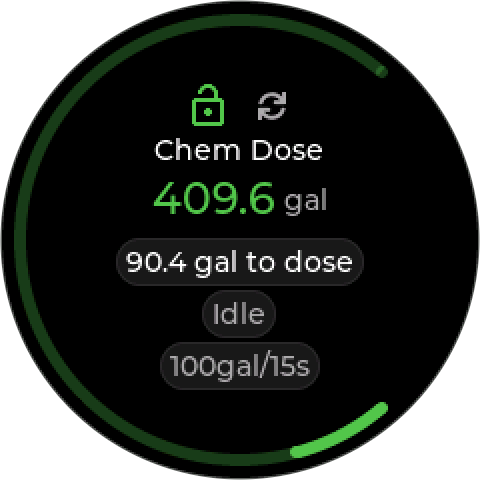
Every mode has a tile on the home screens. Press Enter on it to open the mode’s Review & save page.
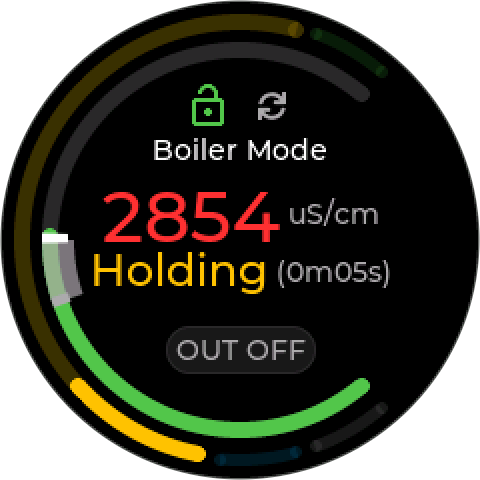
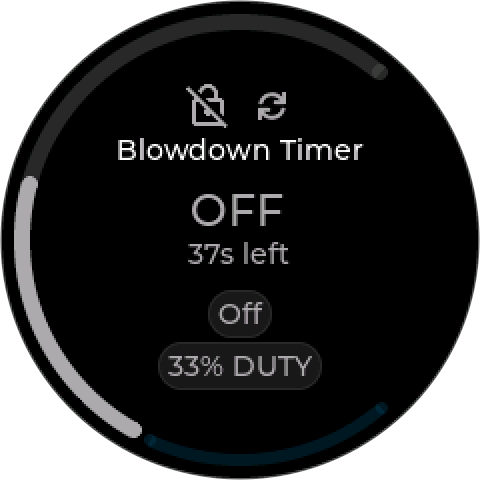
| Part | Shows |
|---|---|
| Padlock, at the top | The mode’s interlocks. Green and open: all clear. Red and closed: an interlock is holding the mode off. Grey and crossed out: no interlock assigned (upcoming firmware; earlier firmware shows nothing). |
| HOA icon, beside the padlock | Who is in charge of the mode’s output, and what it is doing: green arrows (Auto, output on), grey arrows (Auto, output off), an amber hand with the time left (Hand On), or a red crossed hand (held Off). A hand means the mode is running but its output is not following it. See Hand, Off, Auto. (Upcoming firmware; earlier firmware words it as a pill — ON (HOA), OFF (HOA).) |
| Name | The mode’s name |
| Reading | Set Point: the live reading, as large as fits, in the band’s color. Timers show the output, ON or OFF. Volume Dosing shows the metered total. |
| Phase | What the mode is doing: Waiting, Sampling, Holding (with the time), or Active. |
| Pills | The output (OUT ON, OUT OFF), and the mode’s own figures: duty, the volume still to dose, the dose size. |
| Ring | Set Point: the reading’s position between its low-low and high-high limits (or the probe’s range), with ticks where the output switches off and on — green in band, amber past low or high, red past low-low or high-high. Percent Timer: the duty, in blue. Volume Dosing: the volume counted toward the next dose, and the feed time left while a dose runs. A mode with a sampling cycle has an outer ring of phases, the current one wider. |
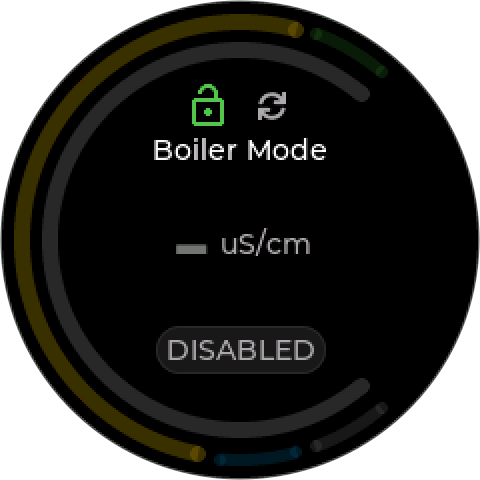
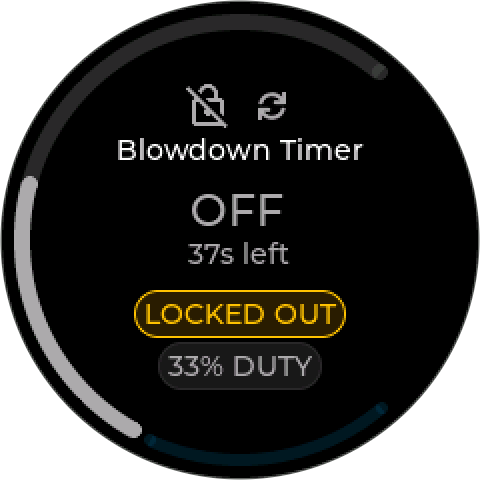
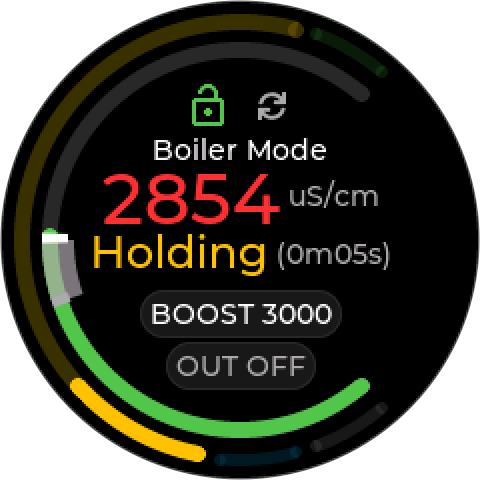
| Pill | Means |
|---|---|
| DISABLED | The mode is switched off. Nothing runs. |
| LOCKED OUT | A Calendar program is holding this mode off. |
| BOOST n | A Calendar program is running this mode at a temporary setpoint, n. |
¶ What every mode does
¶ At start-up
For the first 30 seconds after the controller starts, modes wait for their devices to connect. The screen shows Starting… with a countdown, and no device alarms are raised. Modes start as soon as their devices are ready.
¶ When a device stops responding
If a mode’s sensor or output is missing after start-up, the mode stops, its output goes to its safe state, and the controller raises Control Inoperable (230). The screen shows Mode inoperable. The mode resumes on its own when the device reconnects.
¶ Hand and Auto
An output set to Off  , or switched off at the device itself, will not run even with its mode enabled — the controller warns you when you enable such a mode and offers Return to Auto + enable. Disabling or deleting a mode sends its output to its safe state, unless it is held in Hand or Off — the hold wins. See Hand, Off, Auto.
Disabling a mode is not isolation. Before working on connected equipment, disable the mode and physically isolate the actuator. See Safety.