Smart digital sensors on the controller’s two IO-Link ports — level, distance, pressure, and flow — plus simple contacts such as water meters and flow switches. Each port takes one sensor, wired point to point, powered by the controller.
See Supported Devices for the current sensor list.
¶ The ports
Controllers fitted with the IO-Link board have two ports, Port A and Port B, each an M12 A-coded socket. Without the board, IO-Link Device is not offered under Add Device.
| Pin | Name | Carries |
|---|---|---|
| 1 | L+ | 24 V supply to the sensor |
| 2 | I/Q | A spare digital input |
| 3 | GND | Supply return |
| 4 | C/Q | IO-Link communication — or a digital input or output |
Pin 2 is independent of the sensor on pin 4. One port can carry an IO-Link sensor and a contact at the same time — a level sensor on C/Q and a flow switch on I/Q, for example.
¶ What each pin can do
| Pin | Can be |
|---|---|
| C/Q (pin 4) | IO-Link — a smart sensor. The default on every port. |
| Digital In — a contact or pulse input, configured like I/Q | |
| Digital Out — a 24 V output, switched by hand for testing | |
| I/Q (pin 2) | Digital In — always available, whatever C/Q is doing |
Digital Out cannot be driven by a control mode yet. The pin can only be switched from its Test out control, for checking wiring. Use a relay — a Legacy Relay Device 6 or a wireless output — for anything a mode should switch.
The C/Q output is current-limited to 500 mA and retries automatically after an overload. An overload that lasts raises IO-Link C/Q Overload (611).
¶ Port power
L+ Power switches the 24 V sensor supply on pin 1. It is on when the port is in use, and current-limited: a short that lasts a second makes the port cut the supply, raise IO-Link Supply Short (610), and retry every 30 seconds rather than fail. Only that port is cut; the other keeps running. Turning L+ Power off and on again restarts the sensor — the first thing to try when a sensor has stopped responding.
¶ Configuring a port
Open the port from the device list, or from Add Device → IO-Link Device. The port screen shows the M12 pinout with each pin’s live state, and the L+ Power switch. Choose a pin to configure it.
Once set up, each sensor and each contact gets its own tile:
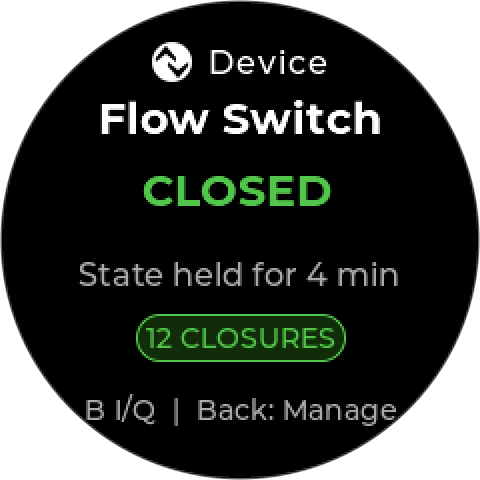
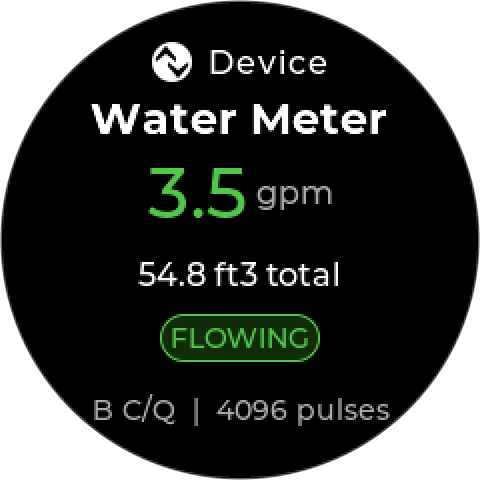
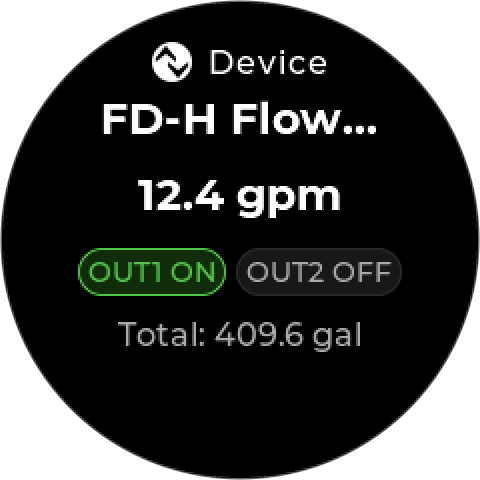
C/Q starts in IO-Link mode and needs nothing further for a supported sensor — see Adding a sensor. To use C/Q for something else, change it to Digital In or Digital Out on the pin’s screen.
¶ IO-Link sensors
When a sensor is plugged in, the controller wakes it, establishes communication, and reads its vendor and device identity. If the sensor is in the supported list, the controller applies its profile, so readings arrive named, scaled, and in the right units — millimeters for a distance sensor, bar for a pressure transmitter. There is no analog signal to scale and no 4–20 mA span to drift.
Sensors report their own capabilities. A sensor that offers a measurement and switch outputs makes all of them available — as readings, as interlocks, or both.
A sensor that is not in the list is detected and reported as unsupported, but it is not added and cannot be used.
¶ What the ports do not do
The ports work with IO-Link sensors, but they do not implement every part of the IO-Link standard:
- No parameter backup and restore (IO-Link Data Storage). A replacement sensor starts with its own factory settings — see Replacing a sensor.
- No IO-Link events. Sensor diagnostics are read from the measurement data instead, where the sensor provides them.
¶ Configuring a contact
A digital input — I/Q, or C/Q set to Digital In — is set up with these rows:
| Row | Choices | What it sets |
|---|---|---|
| Use | Water Meter, Flow Switch, External Stop, Level | What the input means |
| Kind | Contact, Pulse | The electrical kind of the signal |
| Type | NPN, PNP, None | Pulse only. How the sensor drives the line |
| Thresh | Type 1, Type 2/3 | Pulse only. The input switching threshold |
| K-factor | Pulses / gal, Gal / pulse — and a value | Water Meter only. The meter’s calibration |
| On Close | Enable, Disable | Level only. What a closed contact does |
¶ Uses
| Use | Closed contact means | Typical use |
|---|---|---|
| Flow Switch | Flow — the mode may run | Stop feeding into a dead line |
| External Stop | Stop — the mode is held off | A stop from other equipment or an operator |
| Level | Your choice, set by On Close | A tank float switch — low-level cut-out or high-level stop |
| Water Meter | — (counts pulses) | The input for Volume Dosing |
Flow Switch, External Stop, and Level become available as interlocks. A Flow Switch is added to new control modes automatically.
Match the use to the contact, not the other way round. Flow Switch always reads closed = flow, and External Stop always reads closed = stop. If a switch works the opposite way, choose Level and set On Close to suit.
¶ Kind
- Contact — a dry contact or switch. The electrical settings are fixed (an NPN-style input with standard thresholds); there is nothing else to set. Use it for flow, level, and stop switches.
- Pulse — a sensor that sends pulses, usually a water meter. Set Type to match the meter’s output — NPN, PNP, or None for a reed or dry contact with its own pull resistor — and Thresh to Type 1 unless the meter’s datasheet calls for Type 2/3.
Add an external pull-up for NPN sensors and contacts to ground. The port’s internal pull-up is weak against the input thresholds. For a reliable input, fit a 1–10 kΩ resistor from the pin to 24 V.
¶ Water meters
Set the K-factor from the meter’s datasheet, in whichever form it is given — Pulses / gal (for example 10) or Gal / pulse (for example 0.1). The value steps from 0.01 to 1000; the default is 10 pulses per gallon.
The meter’s running total is what Volume Dosing counts. A wrong K-factor makes every dose too large or too small by the same factor, so check it against the meter’s register after a known volume has passed.
To zero the count — after replacing a meter, say — open the contact’s options and choose Reset counter. It asks first.
¶ Wiring
Isolate power before connecting or disconnecting a sensor. See Safety.
- One IO-Link sensor per port. Do not try to share a port.
- Use a standard M12 A-coded sensor cable.
- Keep cable runs away from power conductors and drives.
See Wiring.
¶ Adding a sensor
- Connect it to a free port. The port is in IO-Link mode by default.
- The controller detects it, identifies it, and adds it automatically — there is nothing to save. It appears in the device list with the channels it offers.
- Confirm a plausible reading before using it in a control mode.
Sensors that can measure a tank start in level mode — see Tank settings.
¶ Reading behavior worth knowing
Some sensors report a valid “nothing there” state. An ultrasonic level sensor aimed at an empty tank streams a no-target reply rather than going silent. The sensor is healthy and connected; it has nothing to measure. This is not a fault and does not raise an alarm.
Readings below a sensor’s minimum range are shown but flagged. A distance closer than the sensor’s near limit is displayed with an out-of-range indication rather than hidden or clamped, so a sensor mounted too close is visible as a mounting problem.
Some sensors take noticeably longer to start. The Keyence FD-H10 flow sensor needs around 15 seconds after power-up before it responds, and the Kobold MIK flow meter about 10. The controller keeps it powered while it starts rather than restarting it.
Sensors report diagnostics, not just readings. Many expose their own error and quality bits — stability, interference, over-limit, per-sensor faults. A reading can be present but flagged as untrustworthy; a sensor fault interlock stops a control mode using it.
¶ Tank settings
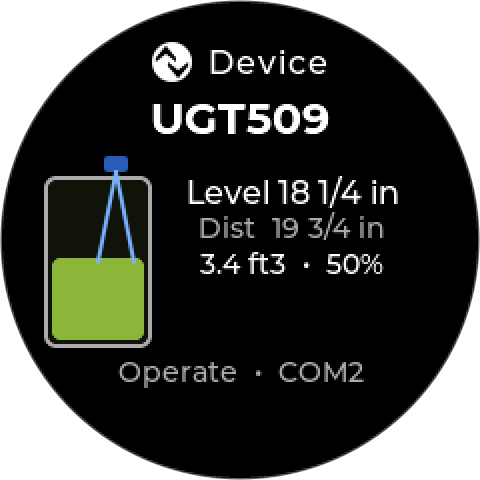
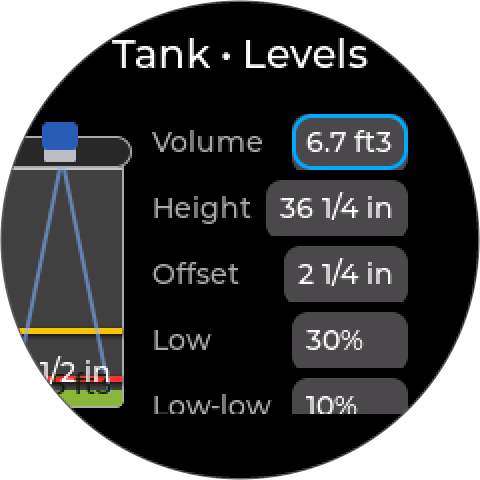
A distance sensor in the top of a tank measures down to the liquid surface — the inverse of the level you care about. Its tank settings describe the tank so the controller can show level and volume instead:
| Setting | What it is | Default |
|---|---|---|
| Height | Usable depth, from empty to full | 1000 mm |
| Offset | Distance from the sensor face down to the full level | 0 mm |
| Volume | Tank capacity when full | 50 US gal |
| Low | Low trip point, as a percentage of height | 33 % |
| Low-low | Low-low trip point, as a percentage of height | 10 % |
- Surface at the top → distance equals the offset → tank full
- Surface at the bottom → distance equals offset plus height → tank empty
Volume assumes straight-sided tanks: half the height is half the volume.
Low and Low-low are written into the sensor. On save, the controller programs them as the sensor’s two switch outputs (OUT1 and OUT2), and they become low-level interlocks. Because they are percentages, they move with the tank if you change its height. Low-low must be below Low — moving Low down past it moves Low-low down too.
If the sensor cannot be updated, the controller shows Could not program OUT1/OUT2. Nothing saved. The tank settings are not saved, but the sensor may already be partly changed — choose Retry, and don’t rely on the sensor’s switch outputs until a save succeeds.
Control modes and interlocks then work in level, so a low-level interlock reads as a low level rather than a large distance.
¶ Replacing a sensor
Same product: plug the new sensor into the same port. The controller identifies it as the same product and it takes over the old sensor’s channels, control modes, and interlocks.
Different product: remove the old sensor from the device list first, then connect the new one. Control modes that used the old sensor are kept enabled but blocked, with their output in its safe state, ready to point at the new one — see Blocked modes.
Settings stored in the sensor do not carry over. The controller does not back up a sensor’s own parameters. Anything configured on the old sensor — switch points, filters, display settings — must be set again on the new one.
¶ Troubleshooting
| Symptom | Likely cause | What to do |
|---|---|---|
| Sensor not detected | Port not in IO-Link mode, or no sensor supply | Check C/Q is set to IO-Link and L+ Power is on. |
| Not detected right after power-up | Slow-starting sensor | Allow a few seconds — around 15 for the FD-H10, 10 for the Kobold MIK — before concluding it is missing. |
| Detected as unsupported | Sensor not in the supported list | It cannot be used until support is added. See Unrecognized sensors. |
| Sensor drops, both ports affected | Controller input power | Check for a power fault (600) first. |
| Sensor drops, one port only | Cable or connector | Reseat the M12 connector; inspect the cable. Cycle L+ Power on that port. |
| Port keeps dropping its supply — 610 | Short or overload on the sensor supply | The port cuts its supply and retries every 30 seconds. Disconnect the sensor; if the fault clears, the sensor or cable is at fault. |
| Reading present but flagged | The sensor’s own diagnostics | Read the sensor’s status bits — foam, interference, mounting, or dirty optics are common causes. |
| Water meter counts wrong | K-factor or input type | Check the K-factor unit (per gallon vs per pulse) and NPN/PNP setting against the meter’s datasheet. |
| Flow switch reads backwards | Contact logic | Swap between open = disable and open = enable. |
For any dropout, the controller raises Device Disconnected (100) and drives the control modes that use the sensor to their safe state.
These sensors are powered by the controller. A power fault (600) cuts their supply, so all of them stop at once. Check input power before investigating an individual sensor.