Calibrating a probe from the controller, so its readings match a reference.
Open the probe from Devices, press Enter for its options, then choose Calibrate. The steps depend on the probe.
¶ Before you calibrate: questions and answers
New to calibration? Read this first. If you have done it before, skip to your probe.
What does calibration actually do?
A probe’s raw signal drifts as it ages and fouls. Calibration compares the probe with something you trust — a standard solution, or a lab or handheld reading — and corrects the probe so the two agree. It does not clean the probe or fix a failing one: it hides a small error, and a large one means the probe needs attention.
Offset, slope, one point, two point — what is the difference?
A probe can be wrong in two ways:
- Offset — it reads a fixed amount off everywhere: 0.2 pH high at pH 4, at pH 7, and at pH 10. One point fixes it: measure one standard and shift the reading.
- Slope (or gain) — it is off by a proportion: right at one end and increasingly wrong towards the other. Fixing it takes a second point, or a known zero, so the controller can see how far the error grows.
A one-point calibration corrects one of the two. On a conductivity probe it corrects the slope (the zero is set by Air Cal); on a pH probe it corrects the offset and keeps the slope. A two-point or three-point calibration corrects both, and is what the Pyxis pH probes run (pH 7, 4 and 10).
Process or buffer — which should I use?
Process calibration leaves the probe in the line and enters a reading taken by a trusted meter or a lab. Control keeps running. It is quick and good for a routine check, but only as good as the meter or the sample.
Buffer calibration takes the probe out and puts it in a solution of known value. It is more accurate, and it is the only way to check a probe you suspect, but control is paused while the probe is out.
A good routine is a process check every visit and a buffer calibration every month or two, or whenever the process check is more than a little off.
How do I know the reading is steady enough?
The controller decides for you. At each step it waits until the reading stays within a small band for a set time — for example 0.05 pH for 30 seconds — and shows its progress while it waits. A probe that will not settle is telling you something: air bubbles, a dirty sensor, a buffer at a different temperature from the probe, or electrical noise. Fix the cause rather than pressing on.
When should I clean instead of calibrating?
Clean first, always, if the probe looks dirty or has been in the line a month or more. Calibrating a fouled probe matches it to the standard today, and it is wrong again as soon as the fouling changes. The controller refuses a correction that is too large (Gain out of range, Offset out of range): that is almost always a probe that needs cleaning, a wrong or old standard, or a probe at the end of its life.
Does calibrating stop control?
A process calibration does not. A buffer calibration, and every Pyxis calibration, holds the control modes that use the probe from the moment you take it out until you finish — see each procedure below. Plan for the time the system runs without that mode.
¶ Which calibration each probe gets
| Probe | Calibration | Where the correction is kept |
|---|---|---|
| Sensorex Smart Sensor, conductivity | Process, or buffer with air zero and one standard | In the controller |
| Sensorex Smart Sensor, pH (upcoming) | Process, or buffer at one standard | In the controller |
| Pyxis ST-500 (upcoming) | Slope in a PTSA standard, or zero in DI water, after a cleanliness check | In the probe |
| Pyxis ST-710 (upcoming) | pH 7, 4 and 10 | In the probe |
| Pyxis ST-712 (upcoming) | pH 7, 4 and 10; or ORP at one standard | In the probe |
| Pyxis CR-300 (upcoming) | Check cap | In the probe |
In the controller means the probe’s own reading is untouched, and the controller corrects it. In the probe means the controller runs the probe’s own calibration procedure and stores nothing of its own. A probe never carries both corrections: calibrating an ST-712 at pH 7 clears any correction the controller held for it from older firmware.
New in an upcoming firmware update. Earlier firmware calibrates the Sensorex conductivity probe only. Other probes are calibrated per their manufacturer’s instructions.
Only one calibration can run at a time. If another is open, the controller says Calibration unavailable. Is one running?
¶ Sensorex Smart Sensor
¶ Choosing a method
| Method | The probe | Use it when | Control |
|---|---|---|---|
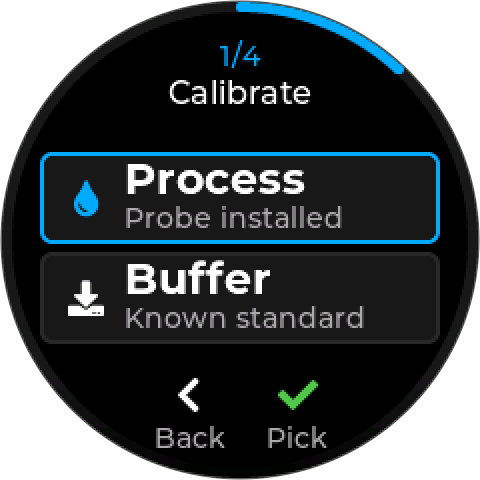
| Process | Stays installed, in the water | Checking against a handheld meter or a lab result | Keeps running |
| Buffer Cal | Comes out, into a known standard | A full calibration, or the probe is badly off | Paused for the duration |
¶ Process calibration
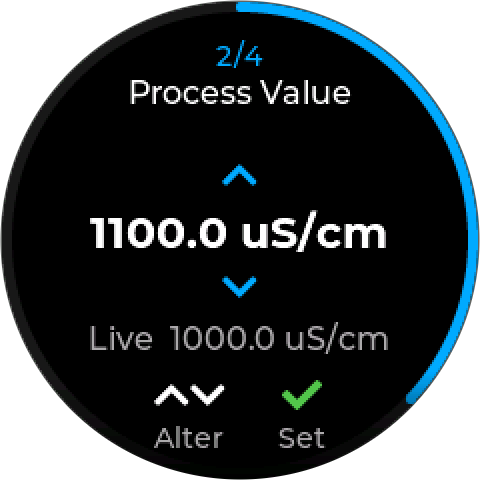
- Take a reading of the process water with a trusted handheld meter, or send a sample to the lab.
- Choose Process. At Process Value, set that reading with Up and Down. The live reading is shown below it. Press Set. If a sampling mode is between samples, the button reads Wait until the next reading.
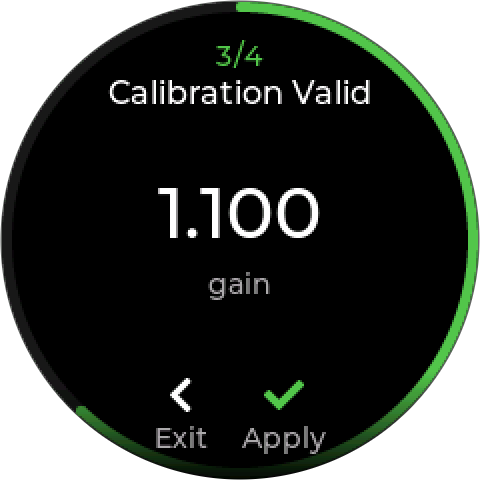
- Calibration Valid shows the correction, as a gain. Press Apply.
- Applied — press Done.
The probe never leaves the line, so control keeps running throughout.
¶ Buffer calibration
Buffer calibration pauses control. Any control mode using this probe stops while the probe is out of the water, and stays stopped until you resume it at the end. Plan for the time the system will run without it.
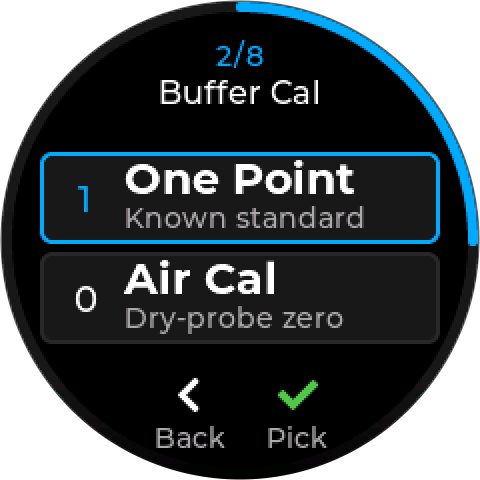
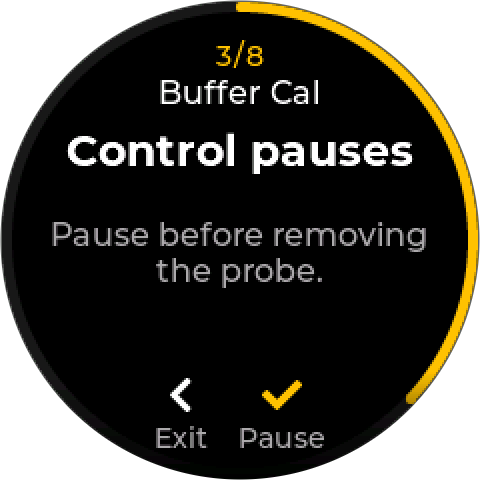
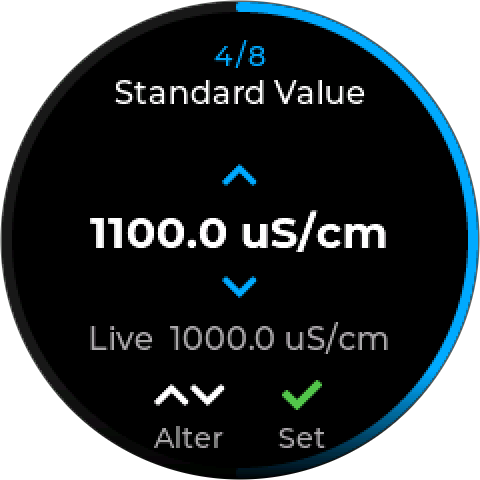
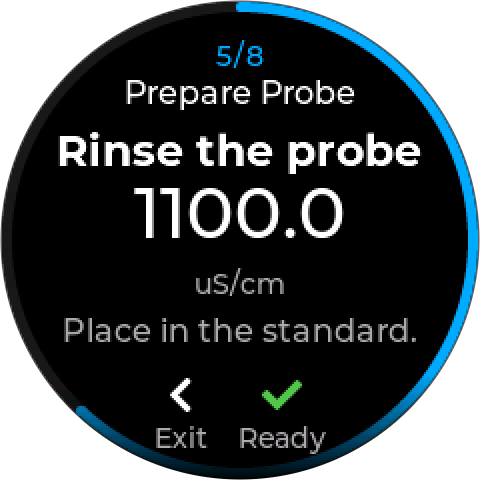
- Choose Buffer, then the calibration:
- One Point — in a known standard. The usual choice.
- Air Cal — conductivity only: a dry-probe zero, in air.
- Control pauses. Press Pause before you remove the probe. Control modes using it stop from here.
- Standard Value (One Point only). Set your standard’s value with Up and Down and press Set. It starts at 1000 µS/cm for conductivity and pH 7.00 for pH; enter whatever your standard actually is.
- Prepare Probe. Rinse the probe and place it in the standard — for Air Cal, rinse and dry it and leave it in air. Press Ready.
- Stabilizing. The controller waits for a steady reading and moves on by itself. Press Use to take the reading now.
- Calibration Valid shows the correction. Press Apply.
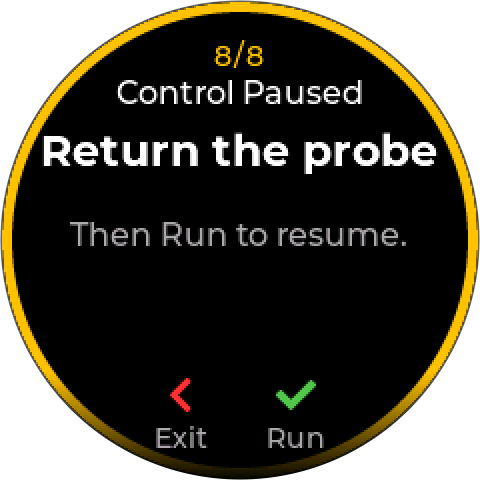
- Control Paused — Return the probe. Put the probe back in the line, then press Run to resume control.
- Applied — press Done.
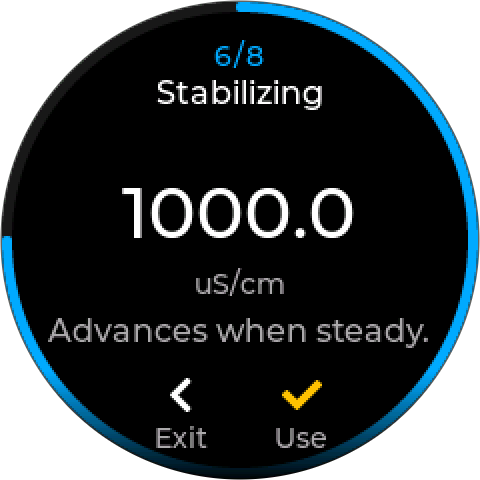
A one-point pH calibration shifts the reading to match the standard and keeps the probe’s slope. A two-point pH calibration is not offered yet.
Sensorex pH calibration is not yet tested on hardware. Check the reading against a buffer after calibrating.
Exit leaves the calibration. No correction is saved until you press Apply.
¶ Stabilizing
At each step the controller waits for the reading to settle, then advances by itself. The screen shows the live reading while it waits. If a probe will not settle, you can move on anyway.
| Probe | Steady within | For |
|---|---|---|
| Conductivity | 2 µS/cm | 30 seconds |
| pH | 0.05 pH | 30 seconds |
¶ When a calibration is refused
The Review step shows Failed, the reason, and what to try — for example Clean probe, retry. Choose Retry to go again.
| Message | Means | Do |
|---|---|---|
| Gain out of range | The correction needed is too large. Conductivity: more than twice, or less than half, the raw reading. | Check the standard’s value, clean the probe, and retry. A probe that still fails needs service. |
| Offset out of range | pH: the correction needed is more than 2.4 pH either way | Check the buffer is fresh and is the value you entered. A probe this far off needs cleaning or replacing. |
| Reading unusable | No valid reading to calibrate against | Check the probe is connected and reading. |
| Not saved — Lost on restart. Retry to save. | The calibration was applied but could not be stored | Retry, or it will be lost at the next restart. |
¶ Going back to factory values
Reset Values returns the probe to its factory calibration, now and after a restart.
¶ Pyxis probes
The Pyxis probes calibrate themselves. The controller walks you through each probe’s own procedure, sends the probe its commands, and shows the probe’s verdict in words.
Control is held from the Prepare step until you leave. Once you press Ready to put the probe in the standard, every control mode using the probe is held. The hold ends when you leave the calibration — after Done, or Back before anything was sent.
The buttons are the same at every step: Up and Down change the value, Enter moves on, Back goes back a step. While the probe is working (Checking…, Calibrating…) the buttons wait for it.
¶ Pyxis ST-500
The ST-500 calibrates its PTSA reading. It checks its own optics first, so a dirty probe is caught before it is calibrated.
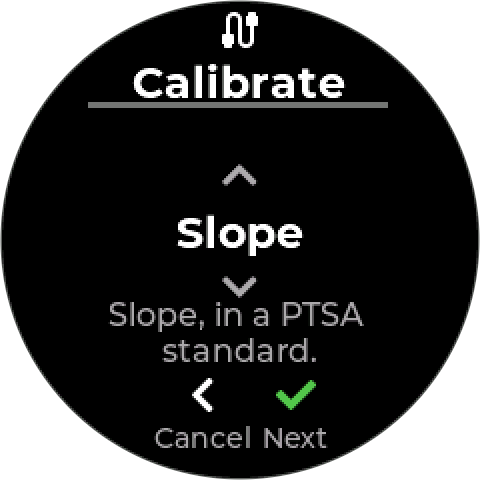
- Choose. Slope, in a PTSA standard, is the normal calibration. Zero, in DI water, is rarely needed.
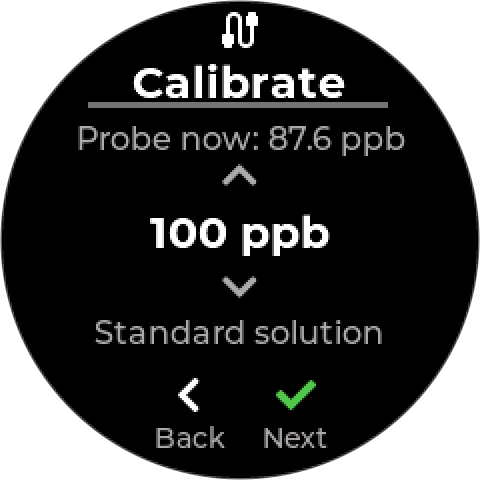
- Standard (Slope only). The value of your PTSA standard: 100 ppb by default, 1 to 300 ppb. The line above shows what the probe reads now. Use a 100 ppb standard if you can: the cleanliness check only works at 100 ppb, and other values skip it (the screen says Check needs 100 ppb).
- Prepare. Rinse the probe, place it in the standard (or in DI water for Zero), then press Ready. Control is held from here.
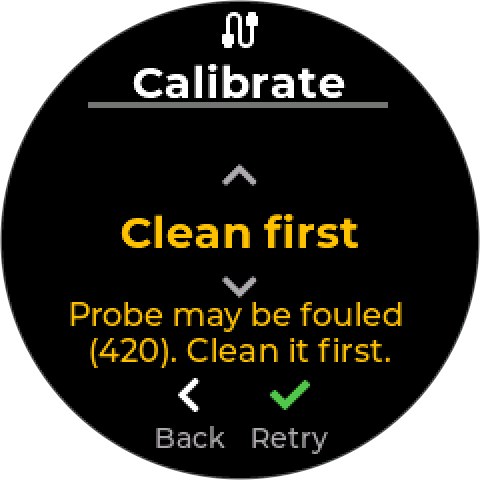
- Check. The probe rates its cleanliness in the solution. If it reads fouled, the screen shows Probe may be fouled with the count, and offers:
- Clean first (Retry): clean the probe, put it back in the standard, and check again.
- Continue (Go): calibrate anyway. Not recommended — a calibration on dirty optics is wrong as soon as the probe is cleaned.
- Settle. The live reading, and Settling… n% until it is steady within 2 ppb for 20 seconds. Press Calibrate when it reads Stable. Ready to calibrate. You can press it earlier.
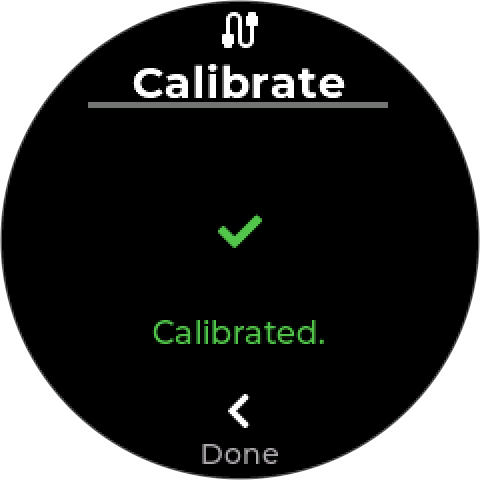
- Result. The probe’s verdict — see below. Retry goes back to Prepare. Done leaves and ends the hold.
Keep direct light off the probe while it settles. Pyxis’s own guidance is in Pyxis ST-500 — Maintenance.
| Result | Do |
|---|---|
| Calibrated. | Return the probe to the line. |
| Probe fouled. Clean it and retry. | Clean it, then Retry. |
| DI water has fluorescence. Use fresh DI water. | Zero only: the water is contaminated. Use fresh DI water. |
| Standard too high for the probe. / Standard too low for the probe. | Check the standard’s value and age, and that the value entered matches it. |
| No answer from the probe. Nothing changed. | Check the probe is connected, then Retry. |
¶ Pyxis ST-710 and ST-712
The ST-710 calibrates pH. The ST-712 asks first: pH or ORP.
pH always runs three buffers, in this order: pH 7.00, then pH 4.00, then pH 10.00. You need the Pyxis pH 4-7-10 buffer pack or equivalent.
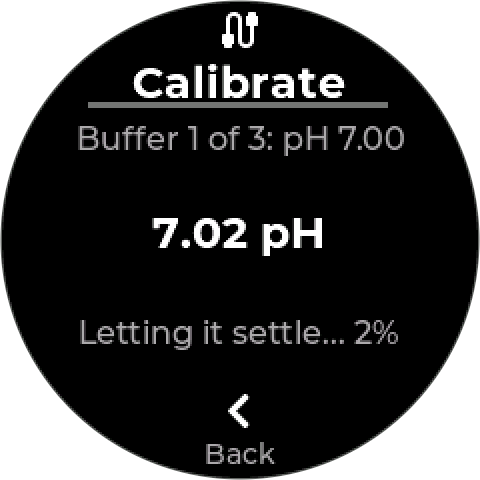
- Prepare. The top line says which buffer, for example Buffer 1 of 3: pH 7.00. Rinse the probe, place it in that buffer, and press Ready.
- Settle. The live pH, and Letting it settle… n%. Calibrate appears only once the reading is steady within 0.05 pH for 30 seconds. There is no early calibrate for pH.
- Result. For example pH 7 OK. Next: pH 4. Press Next for the next buffer. After the third: Calibrated at pH 7, 4 and 10.
ORP (ST-712) uses one standard:
ST-712 ORP calibration is not yet tested on hardware. Check the reading against the standard after calibrating. The pH calibration above has been tested.
- Standard. The value of your ORP standard: 200 mV by default, −1500 to +1500 mV in 5 mV steps. The line above shows what the probe reads now.
- Prepare. Rinse the probe, place it in the standard, press Ready.
- Settle. Calibrate appears once the reading is steady within 5 mV for 30 seconds.
- Result. ORP calibrated at 200 mV.
| Result | Do |
|---|---|
| Buffer value out of range. | The probe does not accept the buffer. Check it is the buffer the screen asks for. |
| Calibration failed. Check the buffer and probe. | Use fresh buffer, rinse, and Retry. A probe that keeps failing is at the end of its life — the ST-71x has no replaceable electrode. |
| No answer from the probe. Nothing changed. | Check the probe is connected, then Retry. |
A failed buffer is retried on its own. The buffers already passed stay done.
¶ Pyxis CR-300
The CR-300 calibrates against a check cap, which stands in for a known corrosion rate. Two come with the probe: 2.0 mpy for steel, 0.1 mpy for copper.
CR-300 calibration is not yet tested on hardware. Until it is, check the probe against its cap without calibrating it: fit the cap, wait 15 minutes, and compare the reading with the cap’s value.
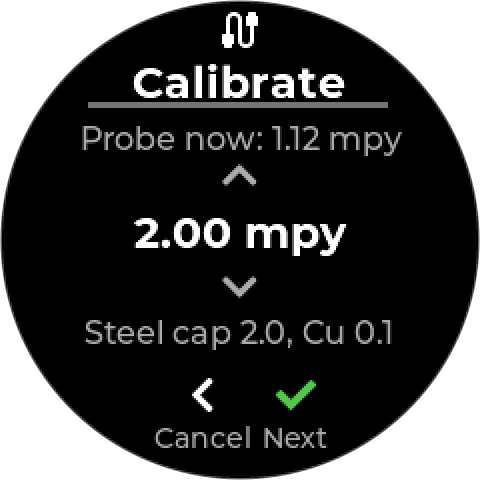
- Standard. The value marked on the cap. It starts at the cap for the probe’s metal — 0.1 mpy for copper, 2.0 mpy for anything else — and can be set from 0.02 to 100 mpy.
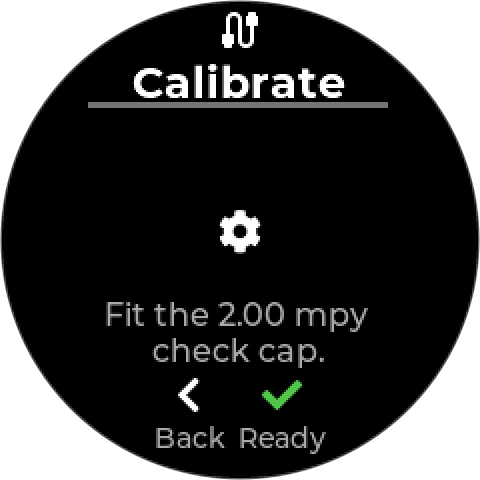
- Prepare. Fit the check cap as Pyxis describes — see Pyxis CR-300 — Maintenance — and press Ready.
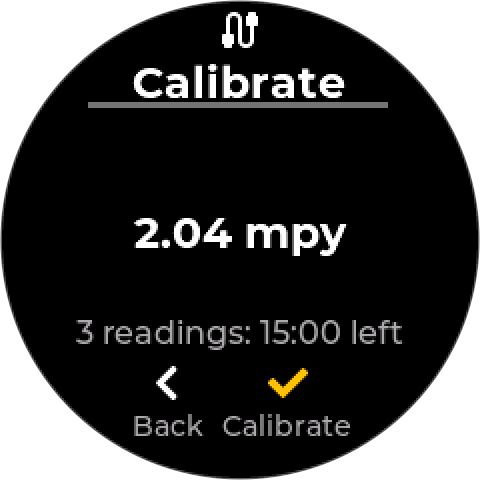
- Settle. The probe needs three readings on the cap, so the screen counts down 15 minutes: 3 readings: 15:00 left, then Three readings in. Ready. You can press Calibrate earlier, but the probe may not have a steady reading yet.
- Result.
| Result | Do |
|---|---|
| Calibrated | Remove the cap and return the probe to service. |
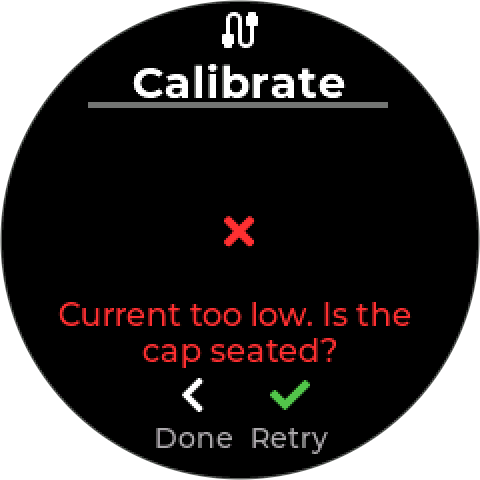
| Current too low. Is the cap seated? | Reseat the cap, then Retry. |
| Current too high. Check the cap value. | Check the value entered matches the cap. |
| Standard out of range (0.02-100) | The value entered is outside what the probe accepts. |
¶ Related
- Calibration Log — a printable record per probe
- Modbus Probes — each probe’s page and settings
- Modbus RTU devices
- Supported Devices
- Setpoint Control