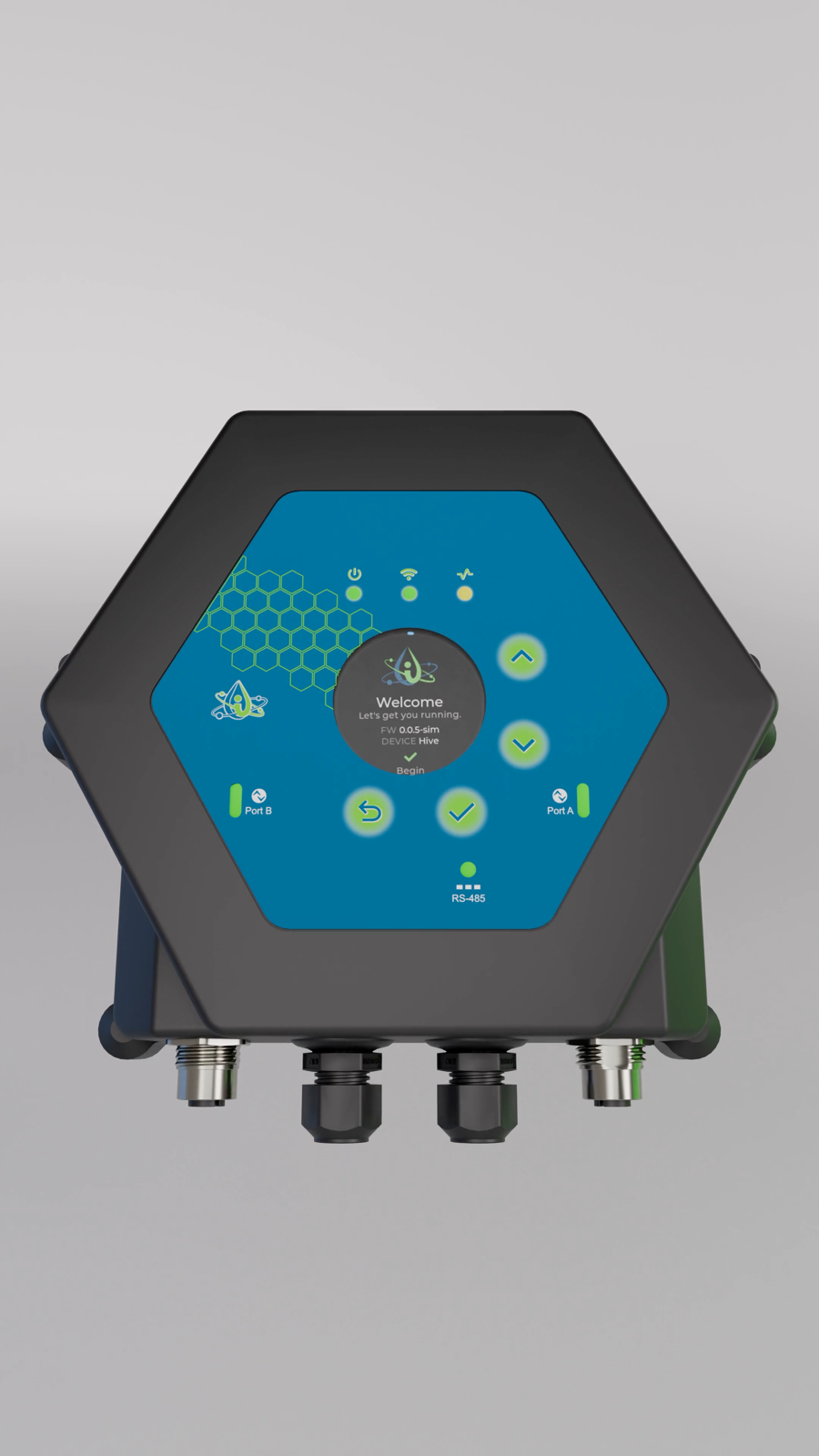
The InteliHive is a controller for water treatment. It reads water-quality probes and level, flow, and pressure sensors, decides what needs to happen, and switches the pumps and valves that do it — continuously, with no operator present.
¶ What it does
A typical InteliHive runs a boiler’s blowdown from a conductivity probe, feeds inhibitor in proportion to make-up water, doses biocide on a weekly schedule, and stops every chemical pump when the day tank runs low. It reports all of it to the Inteliverse platform, and keeps controlling if the internet goes away.
Everything it does follows one path:
- Devices report readings. Probes, sensors, meters, and switches.
- Control modes decide. Each control mode is a rule that turns readings into on/off decisions for one output.
- Outputs act — within whatever interlocks and safety limits allow.
¶ The controller
| Part | What it is |
|---|---|
| Display | A round color screen for status, alarms, and setup |
| Buttons | Four: Up, Down, Enter, Back |
| Status LEDs | Three — Power, WiFi, and Health, from left to right. See What the LEDs Mean. |
| Power input | 24 V DC. See Wiring. |
| Modbus port | RS-485 bus for probes, relay boards, and dosing pumps, with a switched 24 V supply for devices that draw power from it |
| IO-Link ports | Two M12 ports for smart sensors and contacts, on controllers fitted with the IO-Link board |
| WiFi | Connects to the site network for the cloud, and runs its own network for wireless devices |
| USB-C | For firmware work and bench power only |
The controller has no relays of its own. Everything it switches is a device it controls: a Legacy Relay Device 6 on the Modbus bus, a wireless switch or power strip, or a NextStep dosing pump. Choose the output devices when you plan the installation.
¶ What connects to it
| Kind | Connects over | Examples |
|---|---|---|
| Water-quality probes | Modbus | Sensorex pH and conductivity |
| Relays and pumps | Modbus | Legacy Relay Device 6, NextStep dosing pump |
| Smart sensors | IO-Link | Ultrasonic and radar level, pressure, clamp-on flow |
| Contacts | IO-Link | Water meters, flow switches, level switches, external stops |
| Wireless outputs | WiFi | Wireless Relay Expander, Wireless Relay Strip |
Supported Devices lists every model.
¶ Profiles
Each controller runs under a profile, chosen when it is first set up. The profile decides what the setup wizard asks for.
| Profile | For |
|---|---|
| Boiler | Conductivity (TDS) blowdown control, with the boiler’s safety defaults |
| Custom | Anything else — no guided setup; you build the control modes yourself |
Cooling Tower, Closed-loop, and Repressurizer profiles appear in the picker as coming soon.
The profile locks. Once chosen it stays until a factory reset. A unit may arrive with its profile already locked at the factory.
¶ Local first, cloud second
The controller makes every decision itself. The Inteliverse cloud adds remote monitoring, alerting, and reporting, but control never depends on it: if the internet drops, the InteliHive keeps running and reports again when it returns. A controller can run without the cloud at all; it will show Cloud Setup Pending (502) as a reminder.
¶ Next steps
Work through Getting Started in order — mounting, wiring, and first power-up.