An end-to-end walk-through: an InteliHive controlling surface blowdown on a steam boiler, from an empty wall to a controller holding conductivity and signed off. Each step links to the page with the detail.
A boiler is a pressurized, high-temperature system. Only people qualified to work on it should open blowdown or sample lines. Read Safety and Pressurized Systems first.
Print a Commissioning Record and fill it in as you go.
¶ 1. Plan
Settle these with the water treater before you start:
| Decide | From | See |
|---|---|---|
| Conductivity limit — the blowdown setpoint, µS/cm | The treatment program and the boiler’s pressure | TDS and Blowdown |
| Sampling — Timed Sample, Sample & Hold, or Continuous | How the probe is plumbed, and whether the water flashes | The three sampling modes |
| Probe — a conductivity probe rated for the line’s temperature and pressure | The boiler’s operating pressure | Saturation temperature by boiler pressure |
| Blowdown valve and what switches it — a Legacy Relay Device 6 relay, or a Wireless Relay Expander | The valve’s supply and the panel | Devices |
| Online or offline | Site WiFi and whether the cloud is wanted | Network and Cloud |
The controller has no relays of its own: plan an output device for the valve.
¶ 2. Install
- Mount the controller — see Mounting.
- Install the probe on the surface blowdown line, upstream of the blowdown valve and any orifice, so it sees boiler water whenever the valve opens — see Installing the probe.
- Fit the blowdown valve and wire it to its output device.
- Wire power, the Modbus bus, and the output device — see Wiring. For a Modbus probe, check A to A, B to B, and the terminators — see Modbus RTU Devices.
Note the probe’s Modbus address and the valve’s output on the Output Assignment Sheet.
¶ 3. Power up and set up on the Boiler profile
Switch on the 24 V supply and check the Power light is solid green. The controller opens on Welcome — see Starting Up.
-
Setup Method — WiFi Setup to use a phone, or Offline Setup to use the buttons.
-
Time zone and Set the clock.
-
Pick profile → Boiler — Blowdown by TDS. The profile locks until a factory reset.
-
Bind devices — the Boiler profile asks for a conductivity probe and a relay for the blowdown valve. Choose each role, then pick the device. If a device is not listed yet, Add device adds it from here — for the probe, see Adding a device.
-
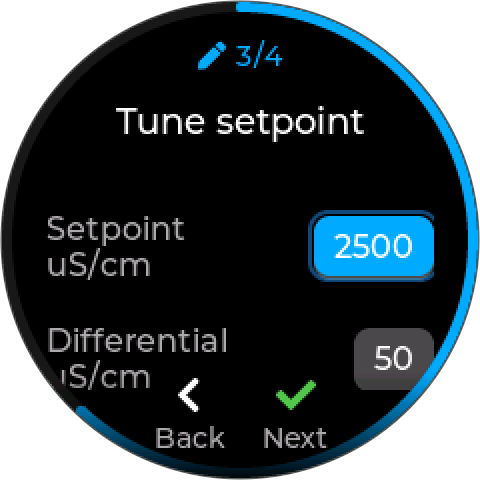
The blowdown loop — enter the setpoint from step 1, and the sampling choice. The differential starts at 50 µS/cm and the direction is Rising.
-
Review setup — it lists what the loop will do: the setpoint, the sampling, the blowdown, and the safety trip it adds. Press Save.
Setup creates one mode, Blowdown Loop, with the Boiler profile’s timings — see Boiler profile starting values.
The Boiler profile adds a latching safety trip. An implausible reading — below 100 µS/cm, above 1.5 × the setpoint, or jumping — forces the blowdown off and latches, and a latched trip cannot yet be cleared from the screen or the app. The loop starts as soon as you save, so before saving make sure the probe is wet and its sample line open — a dry probe reads near zero and trips it at once. See Latching trips.
¶ 4. Check the devices
- The probe shows a plausible conductivity on its tile.
- Run the blowdown valve by hand: open its output device, choose On (Hand) for a minute, and confirm at the valve that it opens and water flows to drain. Return it to Auto. See Manual Control.
¶ 5. Calibrate the probe
Once the boiler is near its setpoint and in control, calibrate against a grab sample cooled to 25 °C (77 °F) and measured with a trusted handheld meter, using a process calibration during a sample — see Calibration for how to take the sample, and Calibration for the steps on the controller. Record it on the Calibration Log.
¶ 6. Watch it work
Stay for at least two sampling intervals — 20 minutes at the default Timed Sample.
| You should see | If not |
|---|---|
| The mode’s tile cycling through its phases: waiting, flushing, reading | Check the mode is enabled and not held by an interlock — see Reading a mode’s tile |
| The reading still at the end of the flush | Lengthen the Flush |
| Blowdown opening above the setpoint and closing 50 µS/cm below it | Check the setpoint and direction |
| No alarms in the Alarms list | See Troubleshooting |
Confirm with the water treater the next day that the boiler’s conductivity, by lab or handheld, matches what the controller holds.
¶ 7. Hand over
- Health light breathing green, Power solid green, WiFi solid green (or off, if running offline).
- The commissioning record filled in and signed, with a copy left at the controller.
- The site shown how to read the tile and the alarm list, and told who to call on an alarm.